Student Cookbook – my first React web app
Building my first React web app for university: a student recipe and meal planning application with Firebase backend, Tailwind CSS styling, and responsive design. Complete development journey from concept to deployment.
From Vue to React: Framework Knowledge Transfer
My first React web app has been created for one of my university units. Whilst I have the most experience in Vue, this project shows that once you get the hang of one framework (and obviously have an understanding of vanilla JS), the knowledge is easily transferable to other frameworks. Of course, syntax will be different, but the logic is pretty much the same.
Background Story
The assessment task was to create a web app in React that would help students. We had to find the area that young people struggle with and think of a tech solution that would in some extent solve it. Seems easy at first, but when you can build anything you want, some serious research is vital to create something actually useful to others.
The Problem I Wanted to Solve
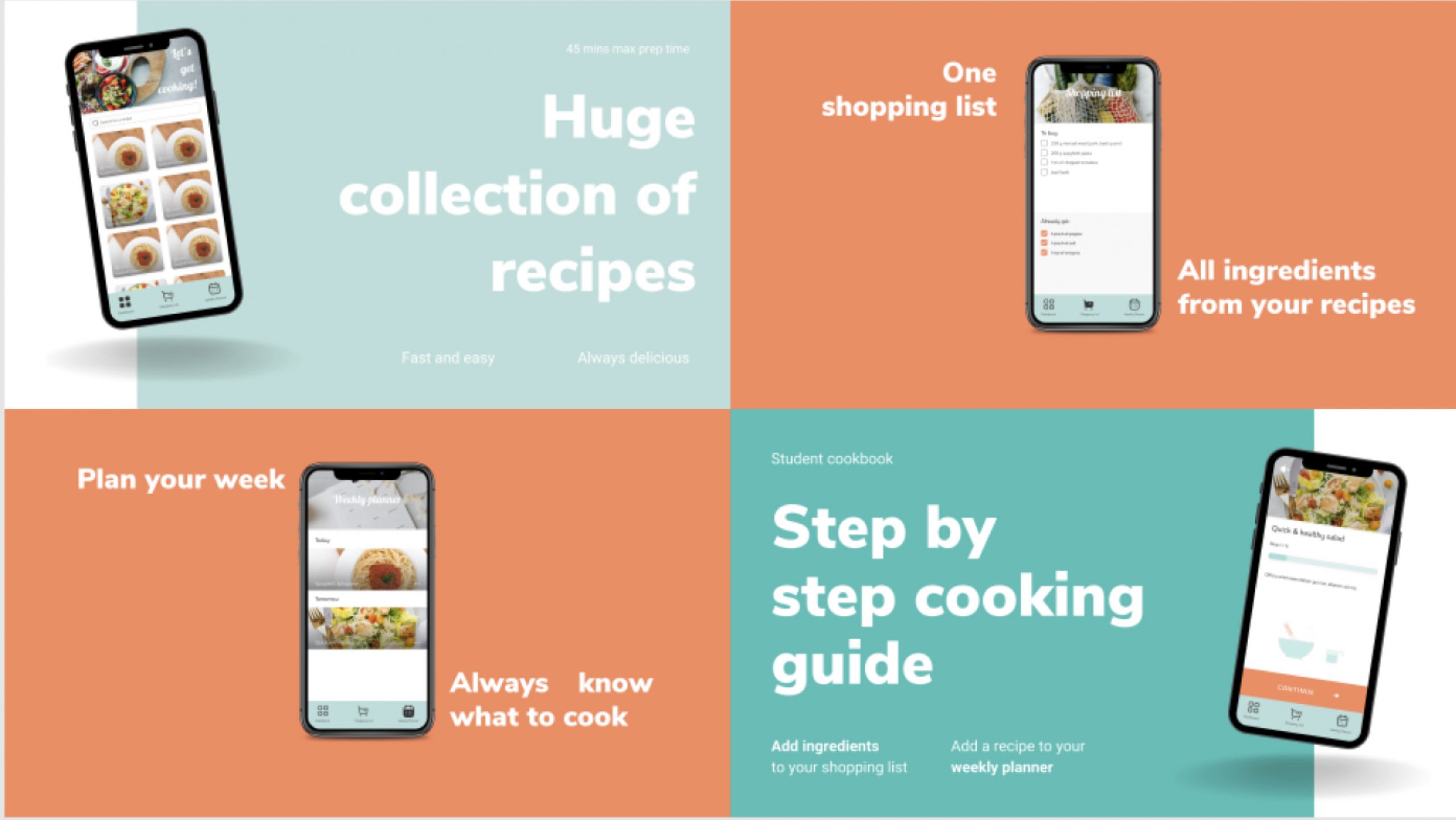
The problem I wanted to solve is poor diet and low cooking skills of young adults. By creating a collection of fast and easy recipes with a step by step guide on how to make them, students will be able to quickly find delicious recipes that won’t take long to prepare. An integrated weekly planner will help students plan ahead what to cook each day, and thanks to a shopping list, they will know exactly what to buy whilst grocery shopping.
Design Process
The next step was to design a web application solution. For this task I used Figma. I remember not liking this software back in first year of uni, being a huge fan of Adobe XD. That has changed, and now I can’t imagine working with anything else! If you haven’t tried it yet, I highly recommend it — it’s free, it’s online, and it has lots of useful plugins too!
High fidelity wireframes
Mobile-First Approach
I focused on mobile screens, as the intention of this app is to use it while cooking, and having your cookbook (and shopping list!) always with you inside your phone. A bottom tab bar gives the web application more of a native app feel.
Design Resources
I used Iconly icons by PicoDesign as they coordinate nicely with the style I wanted. Images are from unsplash.com and empty state illustrations are from Iconscout Store.
App Structure
The home page is where you can find all the recipes. Access a single recipe page by tapping on the chosen recipe tile. From there you can check the ingredients, instructions, add a recipe to your weekly planner and ingredients to the shopping list.
On the weekly planner page you can see all your planned meals. Here you can move recipes to a different date or remove them.
Changes During Development
A few changes that happened during coding:
- Removed search bar due to time constraints
- Changed the colour of the tab bar icons to white
- Slightly different style of the recipe card in the weekly planner
- Slightly different style of the shopping list
If I was creating this app for a client, some of those changes may not have been possible, but because it’s my app, I could. 😃
Development Journey
I created a new repository on GitHub to store my project online and have version control of my code. I followed the installation instructions from the React documentation, added react-router, and then Tailwind CSS. With the scaffolding of my app ready, I created a first commit and pushed the changes to GitHub.
Learning React Coming from Vue
For the last year and a half I was using Vue.js, so this was my first big project in React. I had to Google a lot and my fingers needed a bit more time adjusting to a different syntax (muscle memory is a real thing!), but other than that… well React is quite cool!
Firebase & Firestore Integration
Another novelty for me — and I’m surprised how awesome it is. I will definitely use it more for other personal projects. You can easily host your website for free and if you add Firestore, you have a free database too (with limits of usage on a spark plan, but big enough for my needs). The documentation is really good too, which makes learning a lot easier.
Database and Authentication Features
Thanks to Firestore I was able to create a collection of recipes and pull it down via API into my app, and users have the ability to add ingredients to their list and recipes to their own planners. Registering and log in functionalities are also super simple with Firebase — either a regular email/password or via social media accounts. Firebase is a very powerful tool and surprisingly easy to get the hang of.
Testing & User Experience
You can’t deploy without thoroughly checking everything — I mean EVERYTHING. This is sometimes hard as you know the app, you know the flow and how stuff should be done. Your users don’t. And that’s why it’s important to be prepared for those moments, with 404 pages, toast notifications, error messages, and empty states. Basically anything that will help the user get back onto the happy path if they ever lose track. If you can, ask someone to go through the app and see how they get on with it.
Final Product
You can check my finished Student Cookbook app here: https://cookbook-53824.web.app/
⚠️ Whilst it is a fully working application, I would consider it an MVP (minimal viable product).